

A construction program (or programme, depending on where you learned the trade) is a time-based roadmap that sequences every task on a job, assigns the people and materials needed to do it, and sets the milestones a project has to hit to finish on time. It’s built around a few industry-standard concepts: critical path analysis, an accepted baseline, and dependency logic that shows how one delay ripples into the next.
If you’re staring at a schedule document right now trying to figure out what you’re looking at, here’s what should be in it:
- Tasks and activities — every discrete piece of work, from site clearing to final inspection.
- Durations — how long each task takes, in working or calendar days.
- Dependencies — which tasks must finish before others can start.
- Milestones — fixed points like “slab poured” or “practical completion.”
- Resources — labor, equipment, and materials assigned to each activity.
- Critical path — the sequence of tasks that determines the shortest possible finish date.
Its immediate job is twofold: coordinate everyone working on the site so trades aren’t tripping over each other, and create an objective baseline that both sides can point to later if a dispute over timing or cost ever comes up.
Key Takeaways
A construction program works because it turns a list of tasks into a sequenced, resource-loaded plan that both coordinates the job and holds up as evidence if timing is ever disputed.
| Point | Details |
|---|---|
| Definition | A program is a time-based roadmap sequencing tasks, resources, and milestones toward a delivery date. |
| Core components | Every legitimate program includes durations, dependencies, milestones, resources, and a critical path. |
| Contractual weight | Once accepted, the program often becomes the baseline used to assess delay and extension claims. |
| Living document | Update the program on a set cadence and keep dated records of every revision. |
| Right level of detail | Match a high-level milestone view for clients with a detailed rolling schedule for site management. |
Table of Contents
- Why a Construction Program Matters for Your Project
- What Does a Construction Program Include?
- Who Prepares and Approves the Program?
- How to Create a Construction Program Step by Step
- How Do You Update a Construction Program Once Work Starts?
- High-Level Programs vs. Detailed Schedules: Which Do You Need?
- How Long Should a Construction Program Run and How Detailed Should It Be?
- What Should Every Construction Program Include? A Quick Checklist
- What Tools and Templates Work Best for Building a Program?
- What I’ve Learned Watching Programs Succeed and Fail
- Getting Your Project Scheduled Right From the Start
- Sources
Why a Construction Program Matters for Your Project
A program is the difference between a job site running on guesswork and one running on a plan everyone can see. Without one, delays pile up quietly. A concrete supplier shows up a day late, nobody notices the fencing crew was depending on that pour, and by the time anyone flags it, the whole back half of the schedule has slipped.
A program forces that visibility upfront. It coordinates trades and procurement by showing exactly when each subcontractor needs to be on site and when materials need to land, which matters enormously on residential jobs where three or four trades might overlap in a single week. It also gives you a forecasting tool: because resources and durations are attached to tasks, you can see cashflow needs and labor demand weeks before they hit, not after.
There’s a legal dimension too. On many projects, the program (once agreed by both parties) becomes the accepted programme, the formal baseline against which any later delay or extension-of-time claim gets measured. If a builder wants to argue that bad weather or a client-caused hold-up pushed the finish date, the program is the evidence that shows what “on time” was supposed to look like in the first place.
Here’s what a program actually does for you day to day:
- Keeps trades from overlapping or waiting on each other unnecessarily.
- Flags resource and cashflow needs before they become emergencies.
- Gives the client a realistic, dated view of when they’ll get their driveway, deck, or finished yard.
- Creates a documented baseline that protects both contractor and client if timing gets disputed later.
Pro Tip: Don’t treat the program as paperwork you file and forget. Pull it up every week, even on a small job. The five minutes it takes to check whether reality matches the plan is cheaper than the week you’ll lose catching a missed dependency two months in.
What Does a Construction Program Include?
Every legitimate program shares the same skeleton, whether it’s tracking a two-week driveway pour or a two-year commercial build. Understanding these pieces means you can open almost any schedule and know what you’re looking at within a minute.
Tasks and the work breakdown structure. The program starts by breaking the whole job into a work breakdown structure, essentially a checklist of every activity from site setup to final handover. A driveway project might break down into site prep, formwork, reinforcement, pour, curing, and sealing. A larger build breaks down into dozens or hundreds of activities.
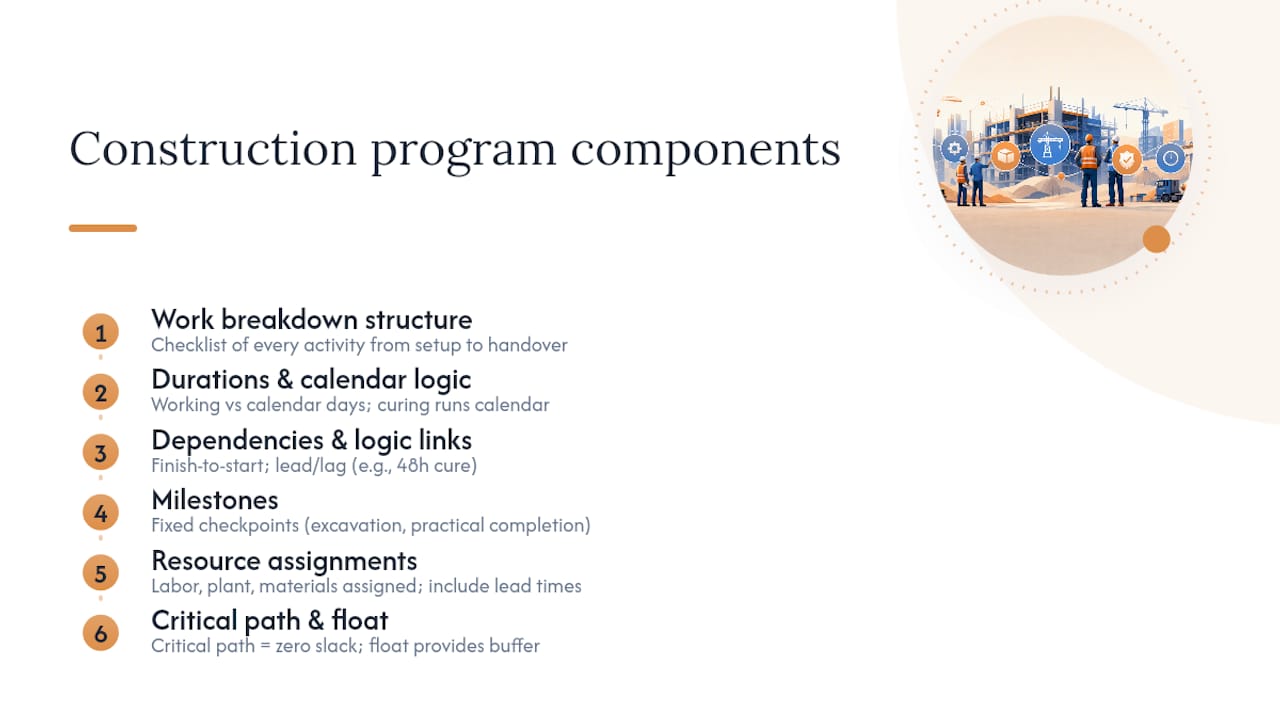
Durations and calendar logic. Every task gets a duration, and it matters whether that’s counted in working days or calendar days. Concrete curing, for instance, runs on calendar time regardless of weekends, while formwork installation typically only counts working days. Mixing these up is a common source of schedule slippage.
Dependencies and logic links. Tasks connect to each other through dependency logic, most commonly “finish to start,” meaning one task can’t begin until the previous one ends. Some tasks include lead or lag time, like a mandatory 48 hour cure before formwork strips.
Milestones. These are the fixed reference points, like “excavation complete” or “practical completion,” that give the client and contractor shared checkpoints without needing to track every underlying activity.
Resource assignments. Labor crews, plant equipment, and materials all get attached to specific tasks, along with their lead times. A retaining wall job might need engineered blocks ordered six weeks out. If that lead time isn’t in the program, the whole schedule is built on a false assumption.

Critical path and float. The critical path is the chain of tasks that has zero slack. If any task on it slips, the project finish date slips by the same amount. Tasks not on the critical path have “float,” meaning some buffer before they start affecting the finish date. This is what separates a real program from a basic to-do list with dates attached.
The concept of an “accepted programme” is worth pausing on, because it shows up constantly in contract disputes. Once a client or their representative formally accepts a program, it typically becomes the contractual baseline for the project, the yardstick used to measure whether the job finished on time and who’s responsible if it didn’t.
Pro Tip: When you’re estimating durations, resist the urge to plug in the fastest possible timeline. Optimistic durations look great on paper and fall apart the first time it rains or a delivery runs late. Build in realistic buffers, especially for weather-exposed tasks like concrete pours and turf laying.
Who Prepares and Approves the Program?
Responsibility for the program shifts depending on the size of the job and the contract form, but the roles are fairly consistent across the industry.
On most residential and small commercial jobs, the contractor or their planner drafts the initial program, since they’re the ones who know how long their crews actually take to complete each task. The project manager or client then reviews it, checking that milestones align with their own expectations and that the sequencing makes sense. On larger or formally contracted jobs, a principal’s representative or contract administrator has the authority to formally accept or reject the submitted program before work begins.
Contract form changes how strict this process gets. Some standard forms explicitly require an “Accepted Programme” as a contract deliverable, with defined timeframes for submission and review. Others treat the program as a working document with looser formal requirements. Contract clauses defining a construction program often spell out exactly when it must be submitted and what happens if it’s rejected or falls out of date.
Once the job starts, responsibility usually splits again:
- The contractor keeps updating the program to reflect real progress.
- The project manager or client representative reviews and formally approves revisions.
- Whoever holds the contract administration role keeps the record of approvals, since that paper trail matters if a dispute ever surfaces later.
If you’re a homeowner working with a contractor directly, understanding this chain still matters. Reviewing a well-drafted construction contract upfront tells you exactly who’s supposed to be producing and approving the schedule on your job, so nothing falls through the cracks between you and your builder.
How to Create a Construction Program Step by Step
Building a program from scratch sounds intimidating, but it breaks down into a manageable sequence, whether you’re scheduling a backyard renovation or a multi-trade commercial fit-out.
- Gather your inputs first. Collect the contract dates, design documents, any fixed milestones the client needs (like a wedding date or move-in deadline), and procurement lead times for long-lead materials.
- Build the work breakdown structure. List every activity the job requires, broken into a level of detail that’s useful without being overwhelming.
- Estimate durations and apply dependencies. Assign realistic durations to each task, then link them together with the correct logic, finish-to-start, with lead or lag time where needed.
- Identify the critical path and resource bottlenecks. Run the logic through to find which chain of tasks has zero float, and check where labor or equipment might be double-booked.
- Produce a baseline and get it accepted. Lock a version, submit it for review, and record the acceptance date. This becomes your reference point for every future comparison.
- Set your update cadence. Decide how often you’ll revise the program and report progress, and stick to it.
Before you sit down to build any of this, gather the following:
- Signed contract with agreed start and completion dates.
- Design drawings and any design freeze dates.
- Procurement schedules for materials with long lead times.
- Site possession or access dates.
- A list of subcontractors and their typical crew availability.
Rolling out a full network diagram with thousands of activities is unnecessary for most residential jobs. The scheduling rigor is what separates a real program from a rough sketch, not the sheer number of boxes on the page, and a simple Gantt chart with proper dependency logic can be just as legitimate as a complex model.
Pro Tip: Keep your baseline short and clean rather than padding it with every conceivable contingency. A bloated baseline is harder to defend later if you need to show what “on schedule” actually meant, and a disciplined version control process with clear acceptance sign-off makes your records far more useful in a dispute.
How Do You Update a Construction Program Once Work Starts?
A program isn’t a document you write once and file away. It’s a living record that gets revised as the job actually unfolds, and how well you maintain that record matters more than most people realize.
Regular updates should happen on a set cadence, typically a short-term lookahead every week or two and a formal update against the baseline monthly. Major variations, like a client-requested design change or an unexpected site condition, should trigger an update outside that normal cycle rather than waiting for the next scheduled review.
Keeping an auditable change history is where a lot of contractors fall short, and it’s often the difference between winning and losing an extension-of-time claim. If your program shows dependency X was delayed by a supplier and you have dated records showing exactly when that happened and what it affected downstream, you have a defensible position. Without that trail, you’re relying on memory and hoping it holds up.
Under contract forms that require an Accepted Programme, revisions typically follow a set approval workflow: the contractor submits the updated version, the principal’s representative reviews it against the current baseline, and formal acceptance is recorded before the revision becomes the new reference point. Failing to maintain contemporaneous records of these changes genuinely weakens a party’s position if a delay claim ever goes to review.
Practical reporting habits that make this easier:
- Run a two to six week rolling lookahead alongside the higher-level baseline.
- Report progress as percent-complete against each activity, not just a vague “on track.”
- Circulate milestone reports to the client so they see fixed reference points, not a wall of task rows.
Pro Tip: Date and file every revision the moment it happens, not at the end of the week when memory has already started to blur the details.
Programs recognized as the contract’s reference document for time and cost assessment carry real weight, which is exactly why the update discipline matters more than it might seem on a small job.
High-Level Programs vs. Detailed Schedules: Which Do You Need?
Not every audience needs the same level of detail, and confusing the two is a common source of frustration on both sides of a project.
A high-level program is milestone-driven. It shows major checkpoints, like “foundation complete,” “framing complete,” “practical completion,” without breaking down every underlying task. A detailed schedule works at the activity level, showing individual tasks, resource assignments, and dependencies down to the day.
| Aspect | High-level program | Detailed schedule |
|---|---|---|
| Primary audience | Clients, executives, lenders | Site supervisors, subcontractors |
| Level of detail | Milestones only | Every activity and dependency |
| Best used during | Pre-tender, procurement, client updates | Site execution, day-to-day management |
Use the high-level version when you’re pitching a project, negotiating a contract, or giving a client a big-picture update they can actually digest without a scheduling background. Use the detailed schedule when you’re managing the site day to day and need to know exactly which trade needs to be where tomorrow morning.
Good practice keeps both aligned to the same baseline dates. Running a rolling detailed lookahead of two to six weeks while keeping the overall baseline at a higher level gives you visibility without drowning in maintenance work.
Pro Tip: Whenever you revise the detailed schedule, check it against the high-level milestones before distributing anything. A misaligned pair confuses everyone and undermines trust in the whole document.
How Long Should a Construction Program Run and How Detailed Should It Be?
Program length tracks directly with project size. A driveway or small landscaping job might run a program spanning two to six weeks. A full home build might run six months to a year. Large commercial or multi-stage developments can run programs spanning multiple years, often broken into phased sub-programs for different stages of work.
Update cadence follows a fairly consistent pattern regardless of project size:
- Weekly lookahead covering the next two to six weeks of detailed activity.
- Monthly formal update comparing actual progress against the baseline.
- Baseline revision only when a major variation genuinely changes the agreed scope or timeline, not for every minor slip.
Granularity is where a lot of programs go wrong in both directions. Too coarse, and you can’t see problems coming because tasks are bundled too broadly to reveal where the bottleneck actually is. Too granular, with thousands of one-day tasks on a residential job, and the program becomes unmanageable, nobody updates it consistently because it takes too long, and it stops reflecting reality within a few weeks.
The practical rule of thumb: avoid activities shorter than a day on a high-level program, and avoid breaking detailed schedules into more granularity than your team can realistically track and update. Granularity also affects how visible your float is. If tasks are bundled too broadly, you lose sight of exactly where the slack sits, which makes resource planning far harder than it needs to be.
What Should Every Construction Program Include? A Quick Checklist
Before a program goes to review or gets handed to a site team, run it against this list.
Document essentials:
- Baseline dates and a clear version identifier.
- Complete activity list with durations and dependency logic.
- Resource allocations, including lead times for long-lead items.
- Milestones, handover dates, and required inspection points.
- Named responsibilities and recorded approval or acceptance signatures.
Supporting documents worth attaching:
- Procurement schedule showing order and delivery dates for materials.
- Design freeze dates confirming when drawings are locked in.
- Site possession notes confirming when access actually starts.
A program missing any of the first five items isn’t really finished yet, even if it looks complete on the page. Coordination between a program and technical documents like a concrete specification matters here too, since curing periods and material lead times feed directly into your duration estimates.
What Tools and Templates Work Best for Building a Program?
You don’t need enterprise software to build a legitimate program, especially on smaller residential jobs. What matters is picking a format that matches the complexity of the work.
Template types worth starting with:
- A simple Gantt chart template works well for most residential and small commercial jobs.
- A work-breakdown-structure-driven template suits projects with more distinct trade packages.
- A lookahead board (physical or digital) works well for site-level weekly planning alongside a higher-level baseline.
Tool categories to consider:
- Desktop scheduling software (Microsoft Project and similar platforms) handles complex, multi-trade programs with heavy dependency logic.
- Cloud-based scheduling tools allow real-time updates that subcontractors and clients can view without installing software.
- Spreadsheet templates remain genuinely sufficient for smaller jobs, a driveway pour or a backyard deck rarely needs more than a well-built spreadsheet with duration and dependency columns.
- Visual lookahead boards, whether a whiteboard on site or a digital kanban tool, work well for short-term coordination between trades.
A spreadsheet is the right call when your project has under thirty activities and one or two trades overlapping at a time. Once you’re coordinating five or more trades with genuine resource conflicts and long-lead procurement, dedicated scheduling software starts paying for itself in reduced planning errors. Whichever format you use, coordinating your program with a document like a concrete placement plan keeps pour timing, curing windows, and trade handoffs aligned instead of guessed at.
What I’ve Learned Watching Programs Succeed and Fail
The programs that fall apart almost always fail in the same place: someone builds an optimistic baseline, gets it approved, and then never updates it when reality diverges. Six weeks in, the “current” program on the wall bears no resemblance to what’s actually happening on site, and by the time anyone notices, there’s no honest record of when things went sideways or why.
The habit that prevents this is boring and unglamorous: update the program on the same day every week, even when nothing dramatic happened. Consistency in the update cycle is worth more than sophistication in the software. VW Concreting has been building and coordinating outdoor construction projects across Melbourne for many years, and the jobs that ran smoothest weren’t the ones with the fanciest scheduling tool. They were the ones where someone treated the update routine as non-negotiable.
If you’re trying to understand how a program fits alongside the rest of your project paperwork, it’s worth reading up on how a construction contract references scheduling obligations, since the two documents are meant to work together, not sit in separate drawers.
Getting Your Project Scheduled Right From the Start
If you’re planning a driveway, retaining wall, or full outdoor renovation in Melbourne, a realistic program from day one saves you from the guesswork that derails so many small projects. VW Concreting builds a working schedule into every job we quote, from driveways and slabs through to fencing, decking, and turf installation, so you know what’s happening and when before the first truck shows up. Get in touch to talk through your project timeline and see how our concreting services fit your schedule.
Sources
Readers who want to go deeper into scheduling mechanics or contractual terminology can start with these:
- The Ultimate Guide to Construction Programmes | Procore UK
- Construction programme — Project Management Formula
- The contractor’s programme — LexisNexis guidance
Leave A Comment